Spectro: macOS 向け偽りなきロスレス検出ツール
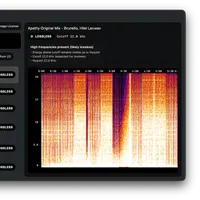
Spectroは、WAV、AIFF、FLACファイルが実際にはMP3などの圧縮形式であるかどうかをmacOS上で検出するツールです。
BeatportやBandcampで購入した楽曲を分析し、プロのオーディオシステムで再生する前に品質を確認できます。
ファイルはローカル環境で処理されるため、インターネット接続やアカウント登録は不要です。
Finderとの連携により、偽ロスレスファイルに赤色タグを付与し、ライブラリ管理を効率化します。
音楽制作者やDJにとって、音源の品質はパフォーマンスに直結する重要な要素です。しかし、ダウンロードサイトなどで入手する「ロスレス(非圧縮)」ファイルを鵜呑みにすると、実は圧縮音源が偽装されているケースがあることが判明しました。macOS向けに開発された「Spectro」は、この「偽ロスレスファイル」を検出するツールとして注目されています。
偽ロスレスファイルとは何か
「偽ロスレスファイル」とは、本来MP3やAACといった圧縮形式である音源を、WAVやAIFF、FLACといったロスレス形式の拡張子に再エンコードして保存したファイルを指します。ファイルサイズは大きくなりますが、音質自体は元の圧縮ファイルと変わらない状態です。
問題は、MP3などの圧縮形式は高周波数の情報(カットオフ周波数)を意図的に失っている点です。この偽装ファイルは、その失われた高周波情報が完全に残っていないため、プロ仕様のPAシステムなどで再生すると、本来の音像が崩れたり、期待通りのサウンドが出ない原因となります。
Spectroの検出技術と機能性
Spectroは、各ファイルに対してFFT(高速フーリエ変換)スペクトル解析を実行し、実際に周波数コンテンツがどこまで続いているかを測定することで偽装を検出します。本物のロスレスファイルは20〜22kHzまでエネルギーが維持されますが、偽ロスレスファイルは通常16〜20kHz付近で急激なカットオフが見られるとのことです。
このツールは、BeatportやBandcampなどのダウンロード元から取得したファイルを処理でき、最大100ファイルを同時にスキャン可能です。また、macOS Finderに直接色付きタグを書き込む機能もあり、再生前にライブラリ全体を視覚的に確認できるのが特徴です。
プライバシーとコストパフォーマンス
Spectroは、ユーザーのファイルをクラウドにアップロードしたり、アカウント登録を求めたりすることなく、Mac上で完全にオフラインで動作します。これにより、高いプライバシー保護を実現しています。
価格は買い切り型で39ドル(税込)と設定されており、月額課金制の競合ツールと比較して非常にコストパフォーマンスが高いとされています。さらに、最初の100トラックは無料で試用できるため、導入のハードルも低い設計となっています。
結論
音源の品質を厳密に管理したいDJや音楽制作者にとって、Spectroは非常に有用なツールとなりそうです。偽装された音源によるパフォーマンス上のリスクを回避し、信頼性の高いライブラリを構築する上で役立つと見られています。
原文の冒頭を表示(英語・3段落のみ)
Find out before the gig.Half your "lossless" tracksare actually MP3s.Fake lossless detector · WAV · AIFF · FLAC · MP3 · AAC · macOSSpectro tells you exactly which WAV, AIFF, and FLAC files in your library are actually compressed MP3s in disguise. Drop your Beatport or Bandcamp downloads and get an instant verdict - before you play them on a professional system.Free for your first 100 tracks · No account required · No internet neededFiles never leave your Mac — no cloud, no upload, no account.< 1sPer file verdict100%Offline & Private2 MacsPer license44.1kHzFull resolutionDrop FilesScanningResultsBuilt for DJsEverything you need to trust your library.Scan your entire library at once.Drop a folder of Beatport downloads or USB promo tracks. Spectro processes up to 100 files simultaneously and delivers an instant verdict for each one.All (92)Fake (29)Lossless (7)Medium (56)macOS Finder integrationFake lossless files, tagged in red.Right in Finder.Spectro writes color tags directly to your files in macOS Finder. Open your DJ Pool folder and every track is already marked — no app to keep open, no renaming, no extra steps.Lossless WAV / AIFFFake lossless — MP3 in disguiseHigh lossy — 320 kbpsFrom the communityWhat users found in their librariesSimple pricing.Spectro$39one-timeOther tools charge $8–15/month.Spectro costs less than three months of theirs — forever.Lifetime license2 Mac licenseFree updatesOffline · Private100-track free trialBuy Spectro — $3930-day money-back guarantee — no questions askedOr start with the free 100-track trialmacOS 13 Ventura or laterNo subscription. No cloud. Your library stays on your Mac.FAQWhat is fake lossless audio?A fake lossless file is an MP3 or AAC that has been re-encoded and saved as WAV, AIFF or FLAC. The file size is larger but the audio quality is identical to the original compressed file - the high frequencies above the MP3 cutoff are permanently lost. Playing a fake lossless on a professional PA system means lost high frequencies and a set that doesn't hit the way it should.How does it detect fake lossless files?Spectro runs a full FFT spectral analysis on each file and measures where the frequency content actually ends. A genuine lossless file has energy up to 20–22kHz. A fake lossless - an MP3 or AAC re-encoded as WAV - shows a hard cutoff, typically around 16–20kHz.Will it work with Beatport and Bandcamp downloads?Yes. Spectro processes files from any source - WAV, AIFF, FLAC, MP3, and AAC.Does it upload my files anywhere?No. Spectro runs entirely on your Mac. Nothing is uploaded, no account is needed, and no internet connection is required for analysis.How does the free trial work?Spectro is free for your first 100 files - no time limit, no account required. Download and try it on your own tracks before buying.What happens after I buy?You receive a license key by email. Enter it in the app to unlock unlimited scans with a 2 Mac license.See all questions →Use CasesStart with your workflowChoose the guide that matches your setup. Each page is focused on one intent so you can move from search to trial quickly.
※ 著作権に配慮し、引用は冒頭3段落までです。続きは元記事をご覧ください。