Unityアセットストアの新しいオーディオマネージャー
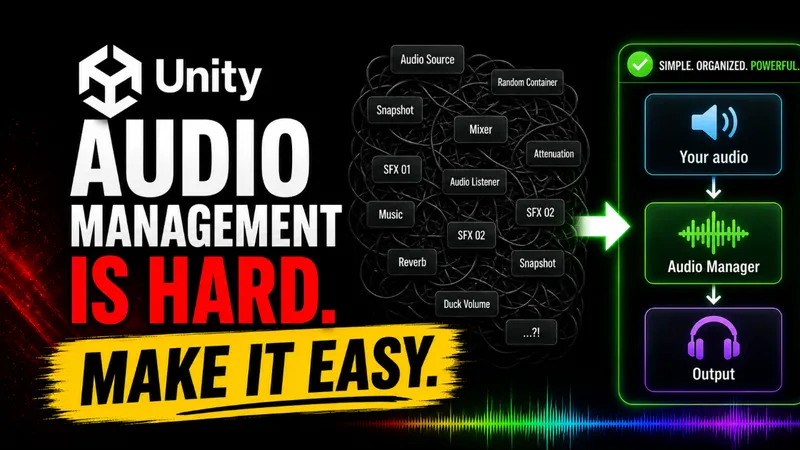 シンプルで高速なオーディオ管
Unity Audio Managerは、簡単に使用できて高速なオーディオマネージャーです。
音声ファイルをアセットストアからインポートし、インスペクターで直接割り当てることができます。
FadeInやFadeOut、ランダムピッチなど多くの機能を備えており、コードを書く必要はありません。
Unity開発者向けに、音声管理を大幅に簡素化する「Audio Manager」が登場しました。このツールは、複雑な音声処理を簡単に実現し、開発効率を向上させることが特徴です。
音声管理の課題を解決
Unityでの音声管理はこれまで非常に複雑で、開発者にとって大きな負担でした。このAudio Managerは、音声のグループ分けやランダムピッチ、フェードイン・フェードアウトなどの機能を内蔵し、作業フローを簡素化しています。
使いやすさと効率の向上
このツールは、わずか1行のコードで音声を再生でき、設定時間も5分以内と非常に効率的です。また、Inspector UIで音声を直接指定できるため、視覚的に操作が可能で、初心者でも使いやすくなっています。
開発者からの高い評価
Unity開発者から高い評価を受けており、コード量を94%削減するなど、作業効率を大幅に向上させるとの声が寄せられています。また、AIエディタのガイドも備えられており、導入がさらに簡単になっています。
まとめ
このAudio Managerは、Unity開発者にとって音声管理の負担を大幅に軽減し、作業効率を向上させる優れたツールです。導入は簡単で、すぐに実用化が可能となっています。
原文の冒頭を表示(英語・3段落のみ)
FeaturesDocumentationSupport5.0Unity Asset StoreUnity audio management is hard.Make it easy.Your audio workflow is broken. Fix it now using this Lightweight Audio Manager.Get itSee documentationTrusted by Unity developersSee what developers like you are sayingabout this Audio Manager.(5)Reliable and Easy to Use, PERFECTLightweight and fast to integrate, up and running in minutes. Clean setup, straightforward API, and reliable in my project. A solid upgrade over a Brackeys-style audio system, with handy AI editor instructions too. Honest 10/10.(5)Super simple to use and very straight forwardJust makes sense, it works really well and very easy to use and implement in any project since it uses the OG unity mixer without having to modify anything with the project just a single line in a script is all it takes.(5)Audio ManagerFinally, an audio manager that actually makes sense. Audio groups, random pitch, fading, and Unity Mixer support all built in. This is how audio should be handled.Everything you need to manage your audioA life-saving, thoughtfully designed system to simplify your workflow and save you time and headaches.Min. time saved10 hrsUser InterfaceIncludedLines of code needed1 lineRating5.0// Assign sounds directly in the Inspector
public SingleSound jumpSound;Inspector assignmentExpose audio variables in Unity's Inspector UI for manual, visual assignment.// Fade in over 0.5s to 100% volume
footstepSound.FadeIn(0.5f, 1.0f);Fade in & outSmoothly fade in or out your music or sound effects, avoiding abrupt endings or harsh cuts.// Play with random pitch between 0.9 and 1.1
※ 著作権に配慮し、引用は冒頭3段落までです。続きは元記事をご覧ください。
Hacker News コメント
機械翻訳。HN の元スレッド ↗
Hello Everyone!
数年間ゲームを作ってきたが、常に苦労したのは音声管理だった。同一のBrackeys audio manager tutorialを何度も開き、毎回新しいプロジェクトで同じオーディオシステムから作り直すことが多かった。
結局、自前のUnity Audio Managerを作成し、各ゲームで改良してきた。現在はGUI、一行音再生、フェードイン/アウト、ランダムピッチ変化、アウディオグループ、インスペクター割当などを含む。
非常に使い勝手が良くて軽量なAPIに仕上がったと自負している。時間短縮や頭痛の緩和に役立つかもしれないと思い、共有することにした。
原文
Hello Everyone! Over the years of making games, one thing I always struggled with was audio management. I can't count how many times I reopened the same Brackeys audio manager tutorial and rebuilt the same audio system EVERY SINGLE TIME from scratch for every new project.Eventually, I decided to make my own Unity Audio Manager and kept improving it with every game I worked on. It now includes things like a GUI, one-line sound playback, fade in/out, random pitch variation, audio groups, inspector assignment, and more.It's very versatile while still being light-weight, and I am really proud of how clean the API turned out.I thought I'd share it here in case it can save someone else a few headaches and a lot of time. Hope it helps! :)